
Virtual Sticky Notes
for Windows- Name Virtual Sticky Notes
- Category Productivity
- Downloads 75,000,000+
- Developer Logan K
- Available on PC, Surface Hub, HoloLens
- OS Windows 10 version 14393.0 or higher
- Architecture neutral
- Keyboard Integrated Keyboard
- Mouse Integrated Mouse
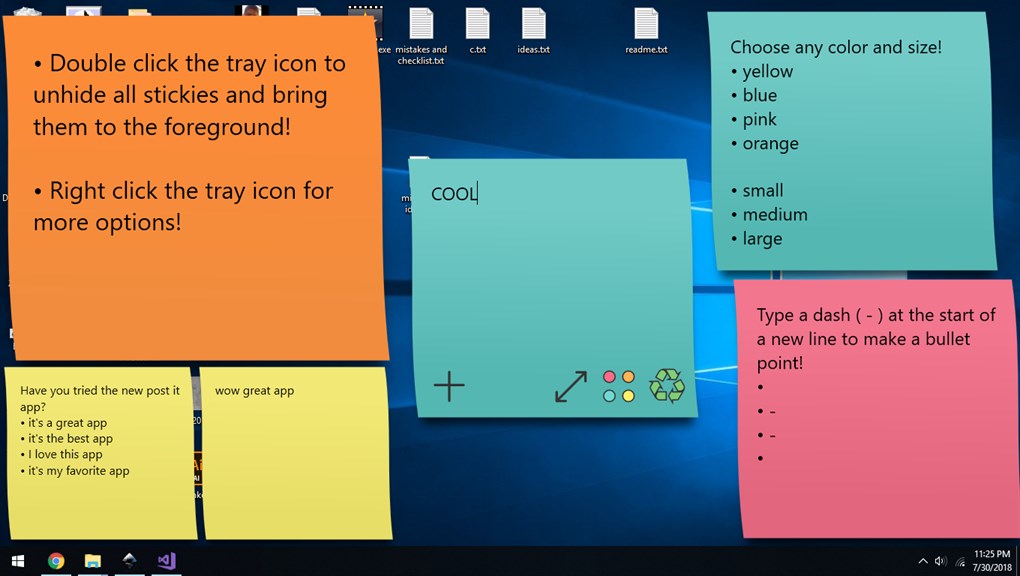
Pros
1. Organization: Virtual sticky notes help keep your thoughts and tasks well-organized on the desktop, offering a clear visual reminder system that can enhance productivity.
2. Customization: These notes usually provide options to customize the size, color, and font, allowing you to prioritize and categorize information easily.
3. Convenience: Unlike physical sticky notes, virtual ones cannot be lost or damaged, and they are easily accessible, editable, and transferable between computers or synchronized across multiple devices.
Cons
1. Limited Physical Interaction: Virtual Sticky Notes lack tangible interaction, which can be less satisfying for users who prefer the tactile experience of handling traditional paper notes.
2. Screen Clutter: Having numerous virtual notes on a PC screen can create a cluttered interface, making it difficult to stay organized and focus on tasks.
3. Dependency on Technology: Virtual Sticky Notes require a functioning PC and software, making users reliant on technological accessibility, which can be problematic during technical failures or when offline.


